Audience
Leaders of mid-size enterprises
Hours, Not Months — Part 3. A tour of ten capabilities that mid-market finance teams are usually quoted as "next tier", "add-on module" or "enterprise edition", and what each one looks like in EAConnect.
If you run finance at a $50M–$500M company, you have probably had this conversation with a software vendor. The entry-level product handles a single entity, one calendar, one currency and a static chart of accounts. The things you actually need — a reorg that doesn't break history, a fiscal calendar that isn't January–December, a group P&L in one currency, reports that send themselves — are in the edition you were not quoted.
The result is that many mid-market teams run "enterprise" requirements on spreadsheets, because the enterprise tools were priced for companies ten times their size.
EAConnect includes the capabilities below in the platform. This article is a catalogue rather than a deep dive: what each one is, why a mid-market team needs it, and a screenshot where we have one. Later parts of the series go into the most-requested ones in detail.
What it is. Every hierarchy — accounts, cost centres, entities, products — is versioned with validity dates. When the structure changes, you close the current version and start a new one from an effective date; earlier periods keep the structure that was true at the time.
Why it matters. Reorganisations happen every year in growing companies. Without versioning you have two bad options: restate all history to the new structure (and lose the ability to reproduce last year's board pack), or freeze the structure and maintain the new one in a spreadsheet.
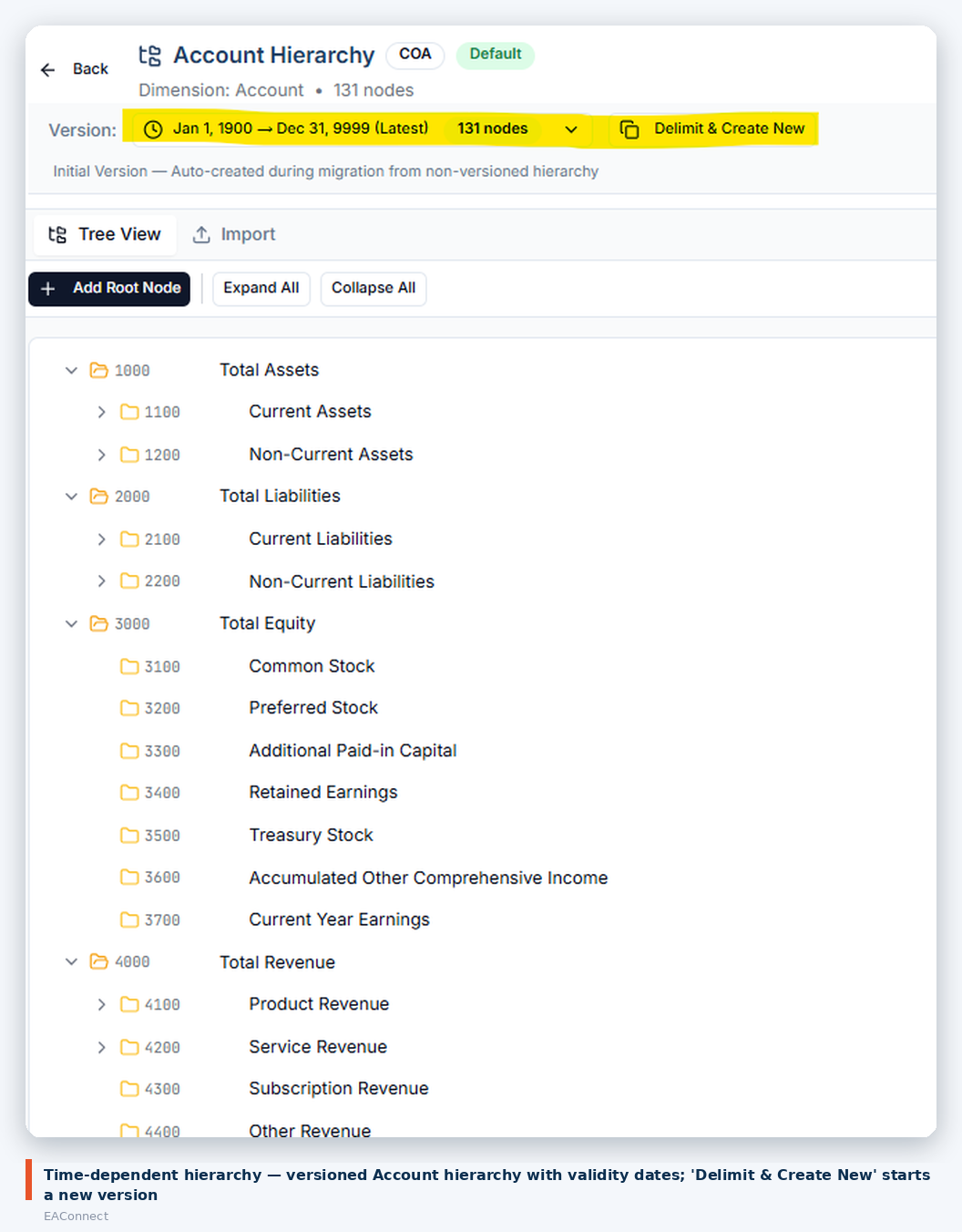
Figure 1. Time-dependent Account hierarchy
In EAConnect. The Account hierarchy above has a version selector showing its validity range and node count, and a Delimit & Create New action that ends the current version and opens the next. Hierarchies can be edited in a tree view or imported. Reports can be run against the structure in force for the period reported, or against the current one.
What it is. Fiscal calendars defined independently of the wall calendar — different year start, week start, period naming and granularity — with more than one calendar available in the same environment.
Why it matters. A retail subsidiary on a 4-4-5 calendar, a parent reporting on a July fiscal year and a management view by calendar month are three calendars, not one. Most mid-market tools support one.
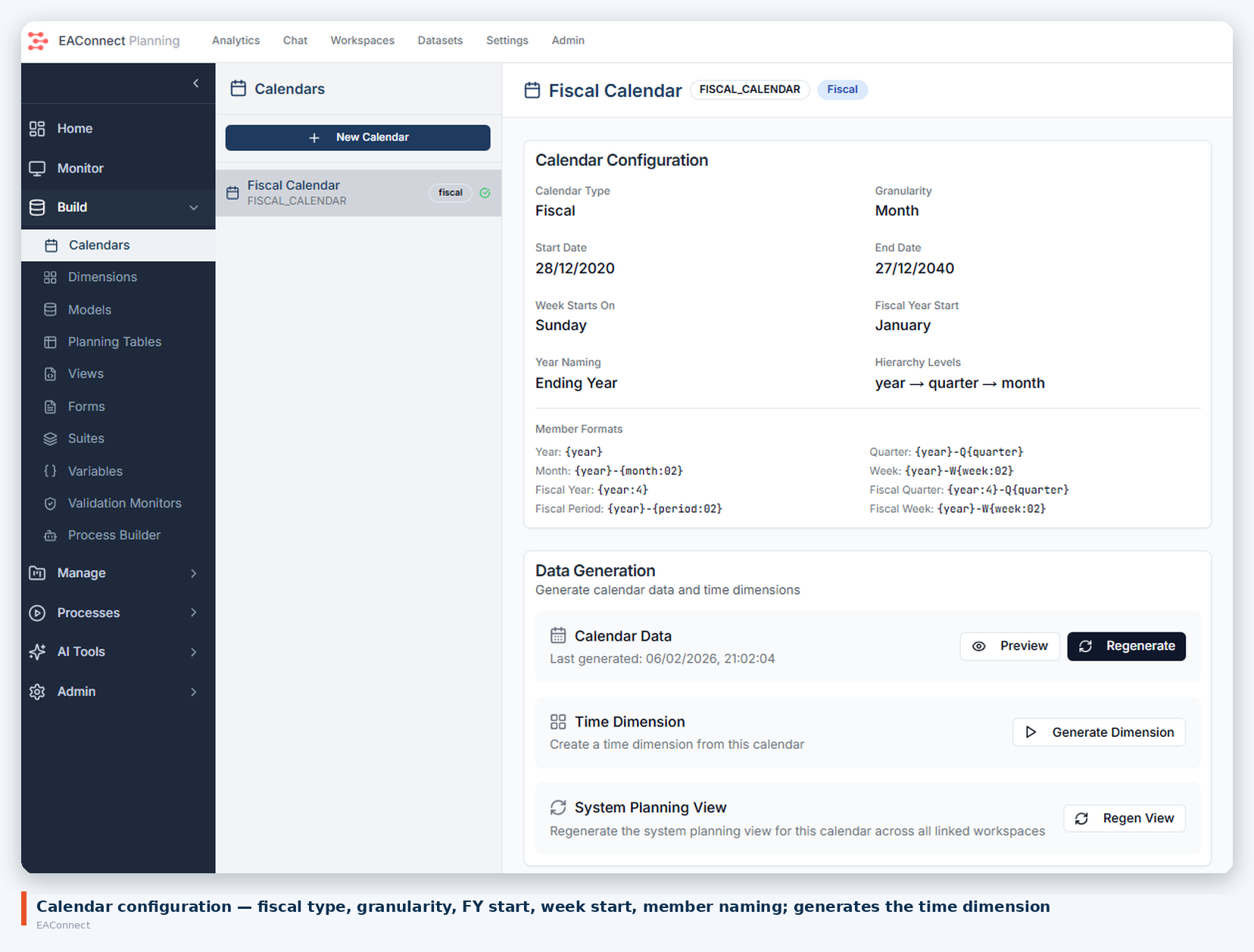
Figure 2. Fiscal calendar configuration
In EAConnect. A calendar is a configured object: type (fiscal or calendar), granularity, start and end dates, week start day, fiscal-year start month, year naming convention, hierarchy levels (year → quarter → month, with week where needed) and member naming formats. From the calendar the platform generates the time dimension and the system planning view. New Calendar creates another alongside it.
What it is. Translation of local-currency amounts into a reporting currency using rate tables by period, so that a multi-entity P&L or balance sheet can be shown in one currency.
Why it matters. As soon as there is a second legal entity in another country, "what is our revenue" has two answers until translation is defined. Doing it in spreadsheets means rates get pasted, formulas drift and the group number is never quite reproducible.
In EAConnect. Exchange rates are loaded as data — the NetSuite master-data flow in Part 2 pulls the rate table as one of its steps — and the model carries both local-currency and group-currency amounts, translated by period. The mechanics of rate types and translation methods are covered in a dedicated article later in this series.
What it is. A forecasting engine that produces a statistical baseline from history (trend and seasonality), and an optimiser for allocation problems with constraints — where to put headcount, capex or inventory given limits.
Why it matters. Most mid-market forecasts are last year plus a percentage. A statistical baseline gives planners a defensible starting point to overlay judgement on, and an optimiser answers "given this budget, what is the best split" without a data-science hire.
In EAConnect. Both engines ship with the planning application rather than as a separate analytics product. A later article in the series walks through a forecast and an optimisation run end to end.
What it is. Scheduled delivery of a report by email, with the report filtered differently for each recipient.
Why it matters. Every subsidiary manager needs their own P&L on the first working day, and somebody in FP&A currently produces those by hand.
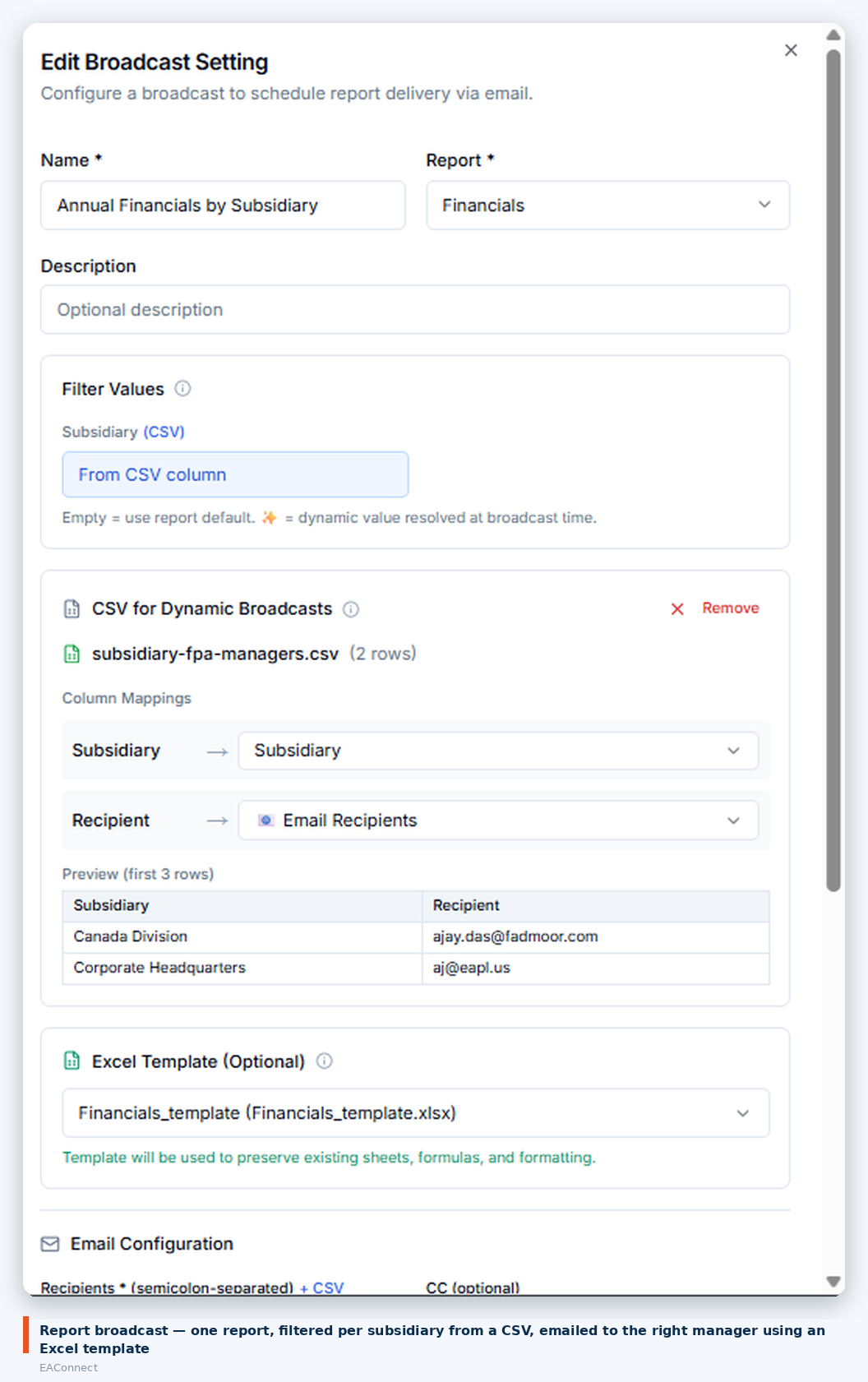
Figure 3. Broadcast setting
In EAConnect. A broadcast names a report, a filter dimension (here Subsidiary), and a CSV that maps each filter value to its recipient — the preview shows Canada Division and Corporate Headquarters each going to a different address. An optional Excel template preserves existing sheets, formulas and formatting so the delivered file looks like the one the manager is used to. Each run is logged with sent and failed counts.
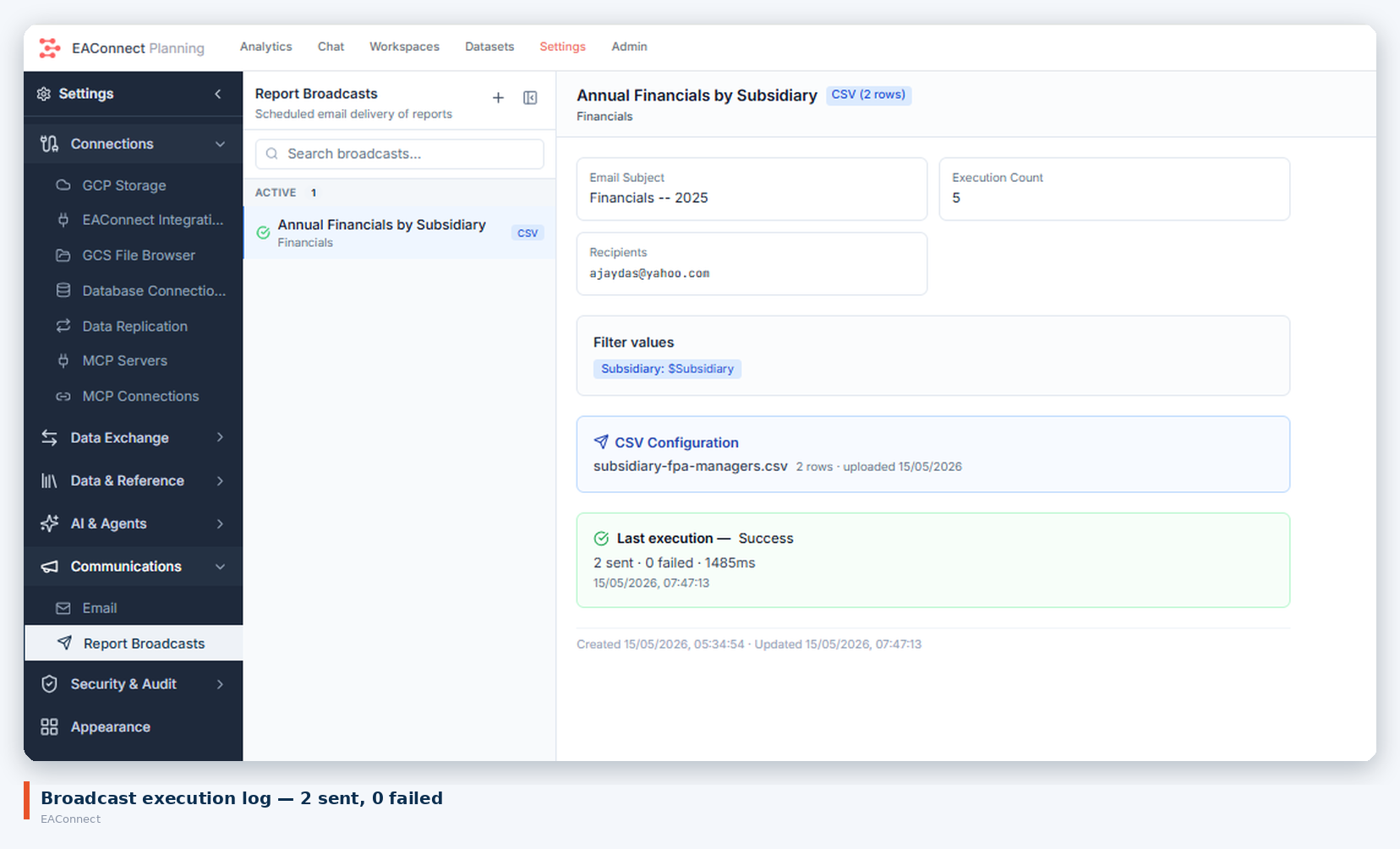
Figure 4. Broadcast execution log
What it is. Reports laid out for presentation — the board pack, the bank covenant report, the monthly management accounts — rather than a grid on screen.
Why it matters. The last mile of every reporting cycle is formatting, and it is where the hours go.
In EAConnect. Reports render into Excel templates that carry the layout, formulas and formatting, so a formatted pack is a template plus live data rather than a monthly rebuild. The broadcast feature above is the delivery mechanism for these.
What it is. A record of who changed what, and when, across data, models and configuration.
Why it matters. Auditors ask. So does the CFO when a budget number moves between the review meeting and the board meeting.
In EAConnect. Security and audit sit under Settings alongside connections and communications, rather than as a compliance add-on. Changes to planning data and configuration are recorded against the user who made them.
What it is. Scheduled agents that read the data, look for what you told them to look for, and file findings into an inbox with a severity.
Why it matters. Analysis is reactive: somebody notices a number, then investigates. An agent watches continuously and raises what it finds, which turns month-end from "why?" into "here is why — confirm or dismiss".
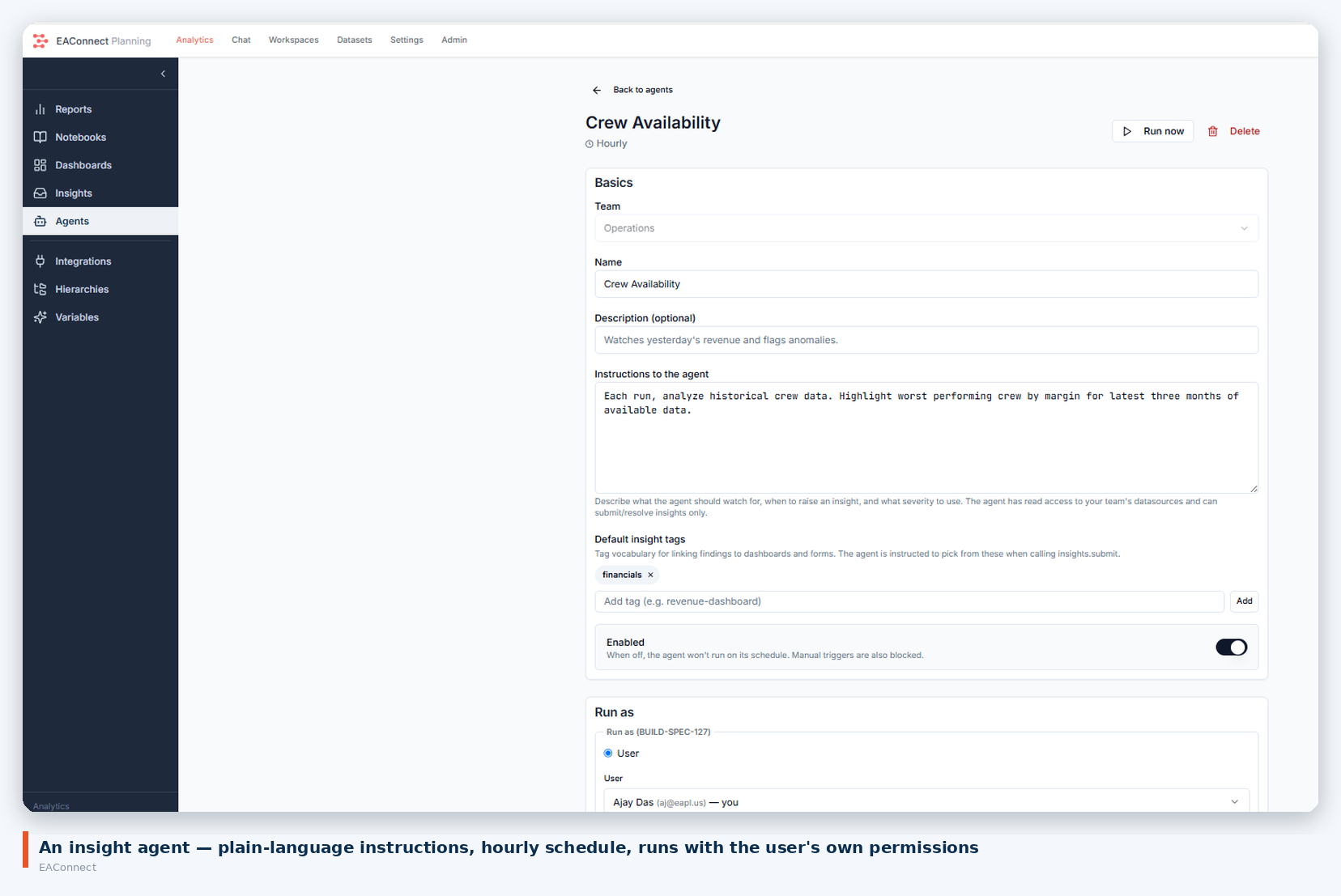
Figure 5. Insight agent definition
In EAConnect. An agent is defined in plain language — the one above is told to analyse crew data each run and highlight the worst-performing crews by margin over the latest three months. It has a schedule (hourly here), a team, default tags for linking findings to dashboards, and it runs as a named user, so it can only see what that user can see.
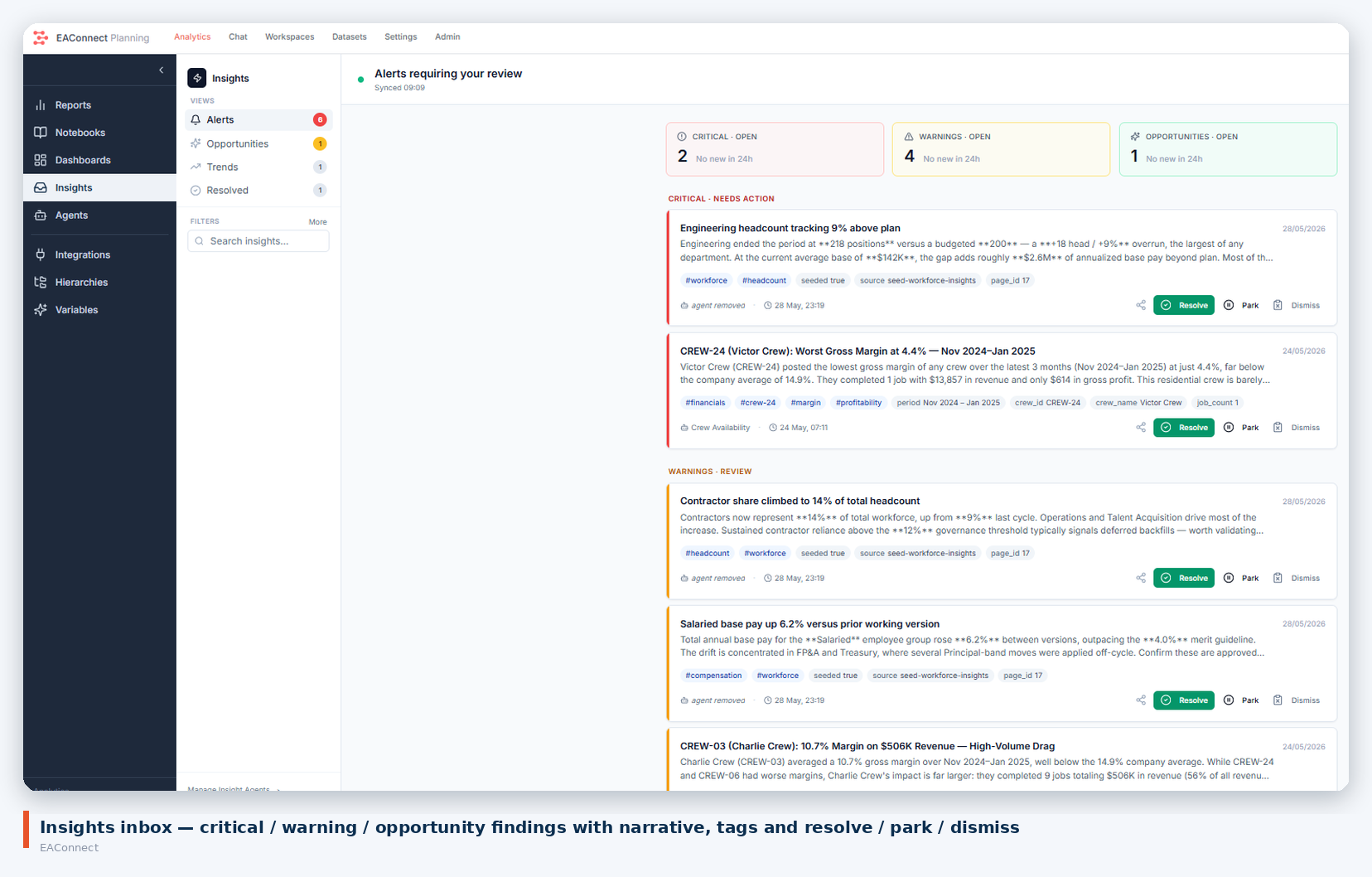
Figure 6. Insights inbox
Findings arrive in the Insights inbox grouped as critical, warning or opportunity, each with a written explanation, the figures behind it, tags, and resolve / park / dismiss actions. In the screenshot: engineering headcount 9% above plan, a crew at 4.4% gross margin against a 14.9% company average, contractor share climbing past a governance threshold.
What it is. The planning cycle as a defined process: who enters what, who reviews, who approves, what gets locked and when.
Why it matters. A budget cycle run over email has no state. Nobody can say which departments have submitted, and the version that gets approved is whichever file was attached last.
In EAConnect. The same process engine that runs integration flows (Part 2) runs planning workflows: start and end points, process steps, sub-flows, validation monitors that check readiness before a step proceeds, and gates for branching. The ABS Planning Suite in Part 1 exposed this as Budget Review & Approval and Budget Submission Workflow pages, and the Planning Monitor tracks workflow executions alongside data loads.
What it is. Building reports, models and analyses by describing them, with the platform's notebooks and chat producing the artefact.
Why it matters. The bottleneck in most finance teams is not ideas for analysis but the time to build each one.
In EAConnect. Notebooks and a chat interface sit alongside Reports, Dashboards and Insights in the analytics application. This is the subject of its own article later in the series, where we show a report authored from a prompt and what it took to make it production-ready.
None of these ten is exotic. Large-enterprise platforms have had most of them for a decade. What is different is that they are included in a platform a mid-market team can stand up in days, and they share one model — the hierarchy versions feed the reports, the calendar feeds the planning grid, the agent reads the same numbers the broadcast sends.
We have shown screenshots where we have them and described the rest plainly. If one of the ten is the reason your team is still on spreadsheets, that is the one to ask us to demonstrate.