Audience
Leaders of mid-size enterprises
In Part 1 a finance team built statements, a dashboard and a planning app from three CSV files. This part replaces the files with live connections to the ERP, HRIS and data stores the company already runs — inside the planning product, with no second licence and no second project.
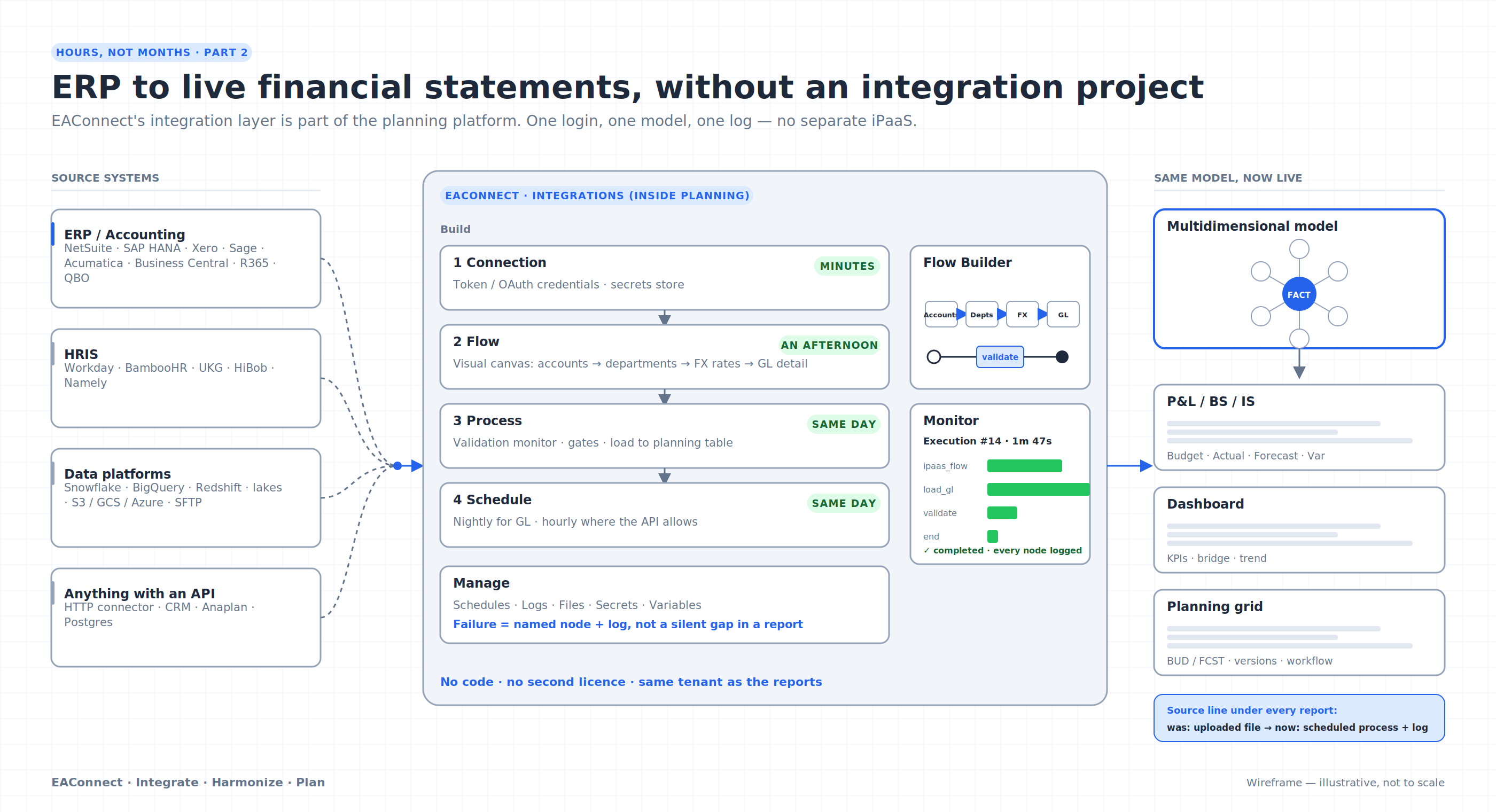
Figure 1. The integration layer, inside the planning platform
Starting from CSV exports was deliberate. It lets a finance team prove the outcome — a variance-analysed P&L, a dashboard, a budget grid — before anyone touches an integration. But files have a shelf life. Somebody has to export them, somebody has to load them, and the moment the ledger moves the report is stale. Month-end packs built on exports are correct for about a day.
The usual next step is where mid-market projects stall. Integration is bought as a separate product (an iPaaS licence), built by a separate skill set, and scheduled as a separate project. The analytics tool ends up waiting on the integration tool.
EAConnect was built the other way round: the integration layer is part of the platform. This article shows what that looks like in practice, what it takes to set up, and where the real effort goes.
Inside the Planning application there is an Integrations section with its own Monitor, Build (Connections, Tasks, Flows, Flow Builder) and Manage (Schedules, Logs, Files) areas. It is the same product, the same login and the same tenant as the reports. The target of an integration flow is a planning table or dataset in the same workspace; there is no export-to-file-then-import step between "integration" and "model".
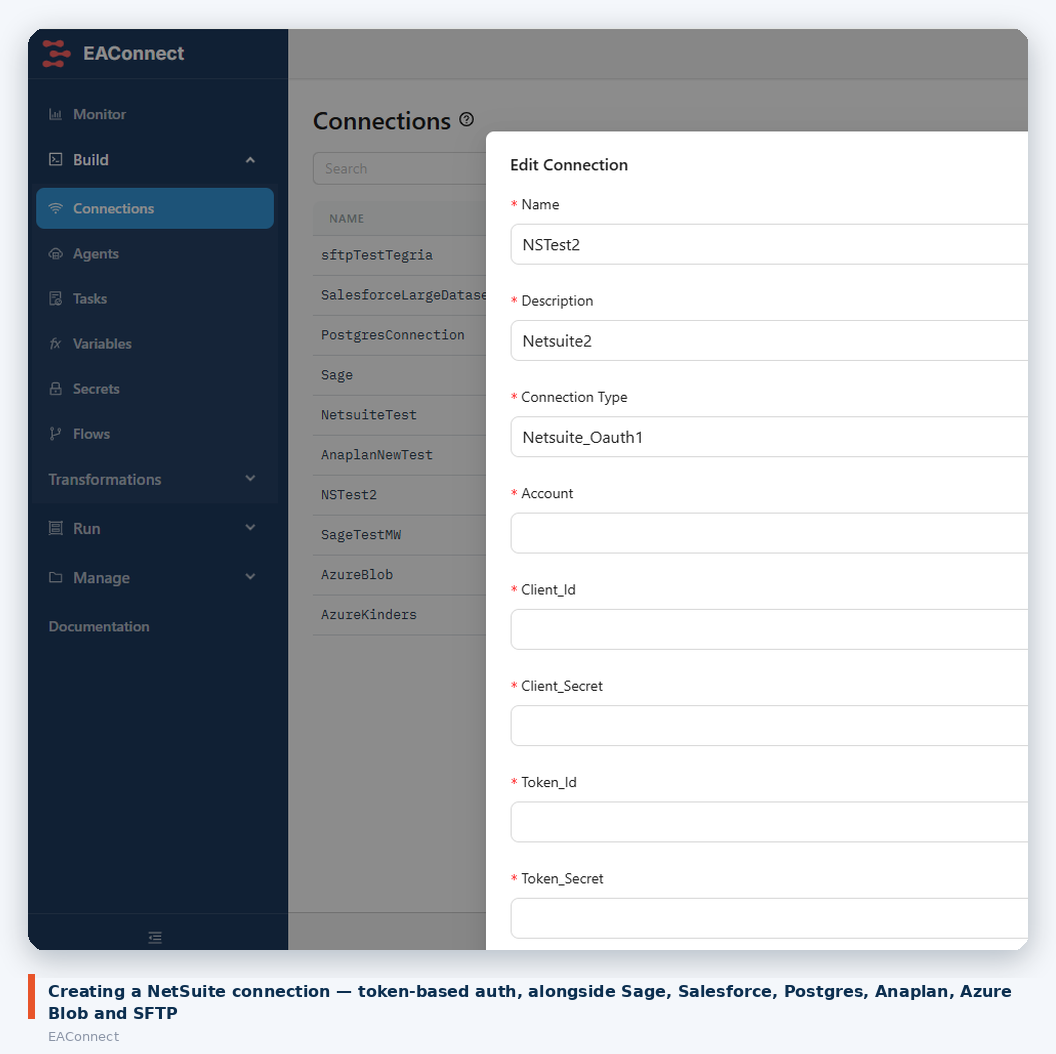
Figure 2. Creating a NetSuite connection
Connectors available at the time of writing include:
The list grows, so treat this as a snapshot rather than a ceiling. If a system has an API, the HTTP connector usually covers it.
Here is the sequence a finance-systems person follows to get GL actuals flowing from NetSuite into the planning model. Nothing below requires code.
A connection is a named set of credentials. For NetSuite that is token-based authentication: account ID, client ID and secret, token ID and secret. Secrets are stored in the platform's secrets store, not in the flow definition. The connection list in the screenshot above also shows Sage, Salesforce, Postgres, Anaplan, Azure Blob and SFTP connections living side by side.
What this actually takes: a few minutes in EAConnect, plus whatever time your NetSuite administrator needs to create the integration record and token on their side. That NetSuite step is often the longest part of day one, and it is outside EAConnect's control.
Flow Builder is a visual, BPMN-style canvas. The example below pulls master data: the account list, the department list and exchange rates, in sequence.
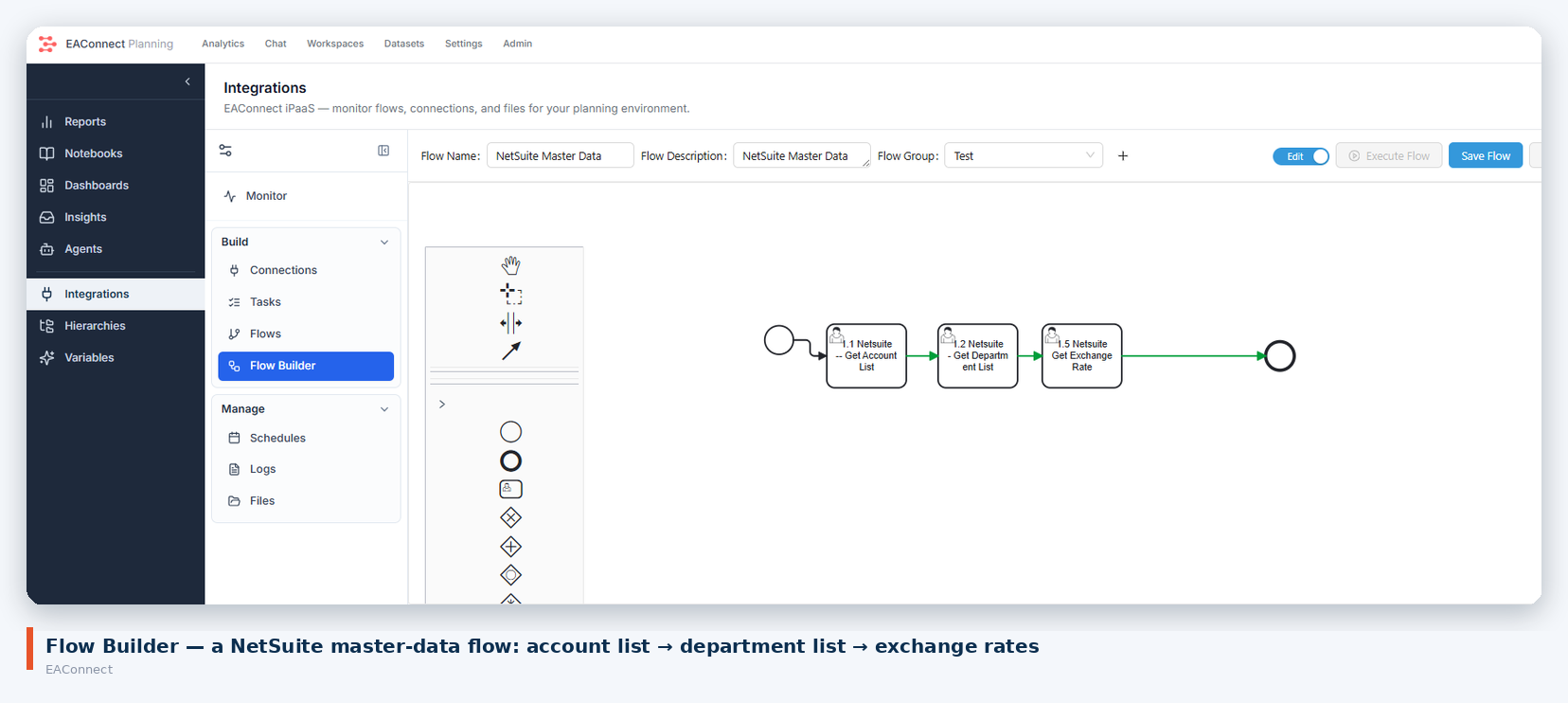
Figure 3. Flow Builder — NetSuite master data
Each step is a connector task with its own configuration (which object, which fields, which filters). Flows are grouped, versioned and can be executed on demand from the same screen while you are building them, so the loop of "run it, look at the rows, adjust" is short.
Integration flows are one node type in a broader Process model. The Netsuite Actuals process below runs the master-data flow, then a Load NS GL Detail step that takes the tabular source and writes it to a planning table.
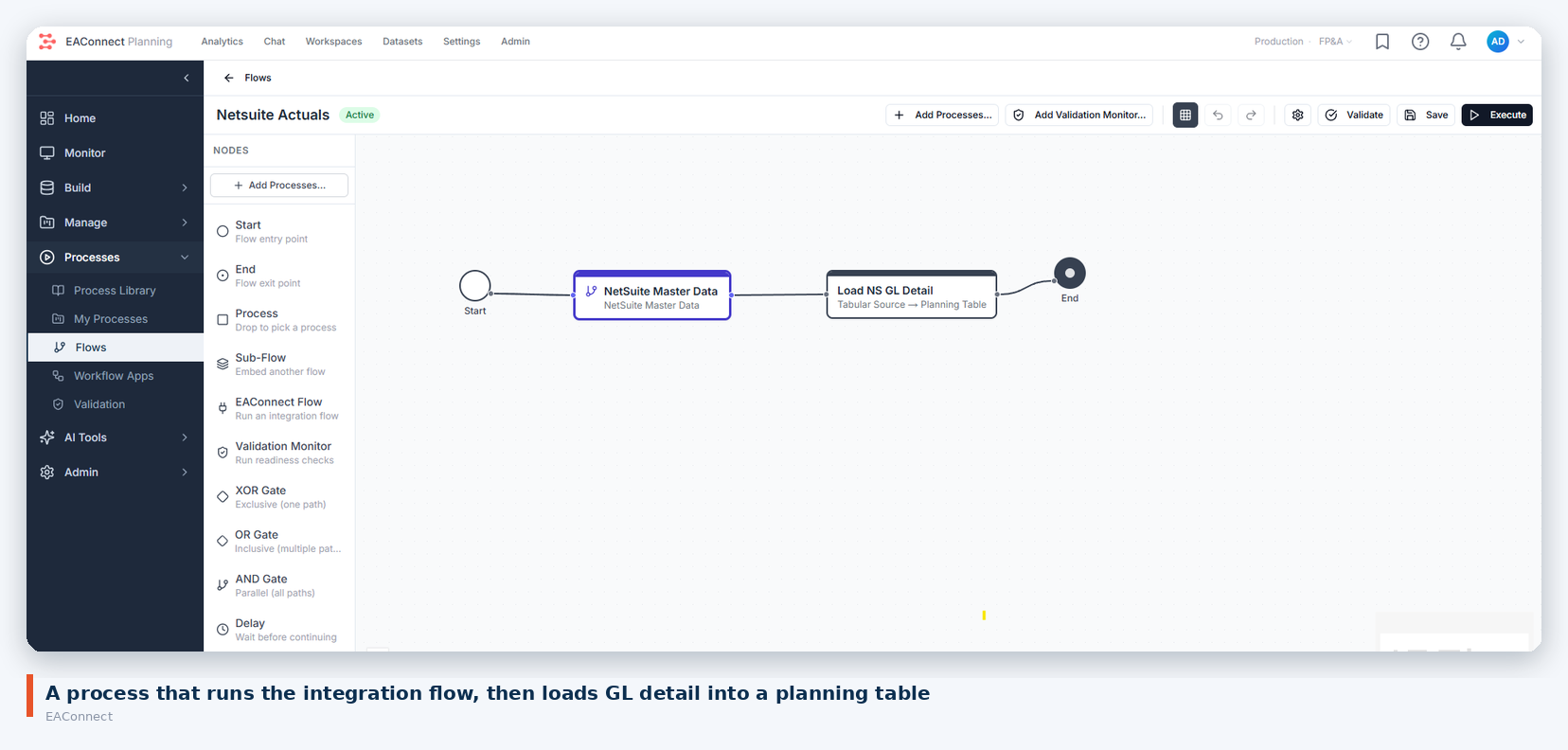
Figure 4. Process — NetSuite actuals
The node palette on the left is worth noticing: sub-flows, validation monitors (readiness checks before a load is accepted), XOR/OR/AND gates for branching and parallel paths, and delays. This is the same process engine that runs planning workflows later in the cycle, so the skill you build here transfers.
Every execution is recorded in the Planning Monitor with a trigger type, start time, duration and node-by-node status, plus a timeline view.
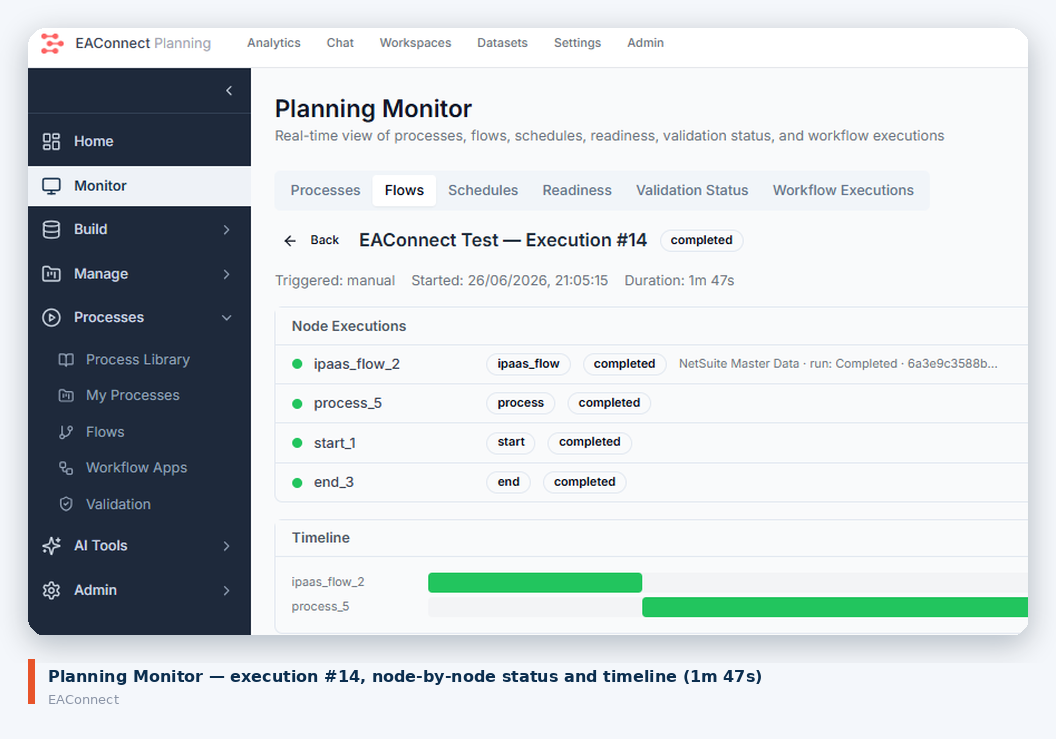
Figure 5. Execution monitor
Execution #14 in the screenshot ran manually and completed in 1 minute 47 seconds. When something fails — an expired token, a changed field, an API limit — it fails at a named node with a log, rather than as a silent gap in a report.
Once a run is clean, it goes on a schedule. Nightly is typical for GL actuals; hourly is possible for operational data where the source API allows it.
For someone who knows their ERP and has admin cooperation on the source side:
| Step | Typical effort |
|---|---|
| Source-side setup (integration record, tokens, permissions) | Depends on your ERP admin — minutes to a day |
| Connection in EAConnect | Minutes |
| Master data + GL detail flow | An afternoon, including test runs |
| Process with validation and schedule | Same day |
| Historical backfill | Governed by data volume and the source API's rate limits — plan for it to run overnight for multi-year history |
The decisions that take longest are not technical: which subsidiaries, which accounts, which posting periods count as "closed", how to treat adjustments after close. EAConnect does not make those decisions for you; it makes them cheap to change once made.
The same mechanism covers the other sources a planning model needs:
There is also an MCP Servers area under Connections. That is the channel through which the platform's AI agents reach data, and it is the subject of a later article.
The P&L, dashboard and planning grid from Part 1 do not change. What changes is the "source" line underneath them: from a file somebody uploaded to a scheduled process with a log. The team that spent day one proving the outcome on CSVs spends day two wiring in the ERP, and the report they showed the CFO yesterday is the one that refreshes tonight.
Next in the series: the features mid-market teams are usually told need a bigger platform — versioned hierarchies, multiple calendars, currency translation, broadcasting, insight agents — and what each looks like in EAConnect.